Project Haven
Immersive Interactive Visual Novel
Design an exciting and engaging text-adventure game to introduce incoming UChicago freshmen to its academic culture and facilitate connection making
Challenge
Sole designer on a 20 people cross-functional team
UI/UX designer
Game system designer
Illustrator
Roles
Overcome technical limitations through creative design solutions
Game system design to constantly drive player retention and boost motivation
Collaborate and facilitate a cross-functional team to produce outcome in fast-paced environment
Storytell and branding using UI/UX Design
Learning objectives
Timeline
2 Months
Information Architecture
Game flow wire-framing & prototyping
UI/UX design
Graphic design & illustration
Usability Testing
Responsibilities
Figma
Procreate
Adobe illustrator
Html/Css/Javascript
Tools
Project background:
Project Haven is a multimedia text-adventure game created to introduce incoming UChicago freshman to the university’s core academic culture while helping them connect before arriving on campus.
Project Outcome:
As the sole UI/UX designer on a 20-person cross-functional team, I shipped 50+ adaptive interfaces and visual assets. With a complex game structure, whose mechanics change with every chapter, I designed an adaptive navigation system that streamlined activities, progress tracking, and social interaction across five evolving chapters. Launched under two months, Haven reached 1000+ active players by the first week, with a 20% improvement in puzzle completion after implementation of a sticker reward system that I led.
Project Summary
Understanding the narrative and requirements:
A game that changes as players progress
Game background & goals
Project Haven spans four islands representing different academic disciplines. Across five chapters, the experience evolves from guided exploration to puzzles, collaboration, and social interaction.
Together, the project goal is to create an interconnected system that encourages students to engage with multiple disciplines rather than remaining confined to one.


As each chapter introduced new features and interactions, how could we keep navigation intuitive without requiring students to relearn the system?
Working with evolving game structure: requirements, functions & constraints
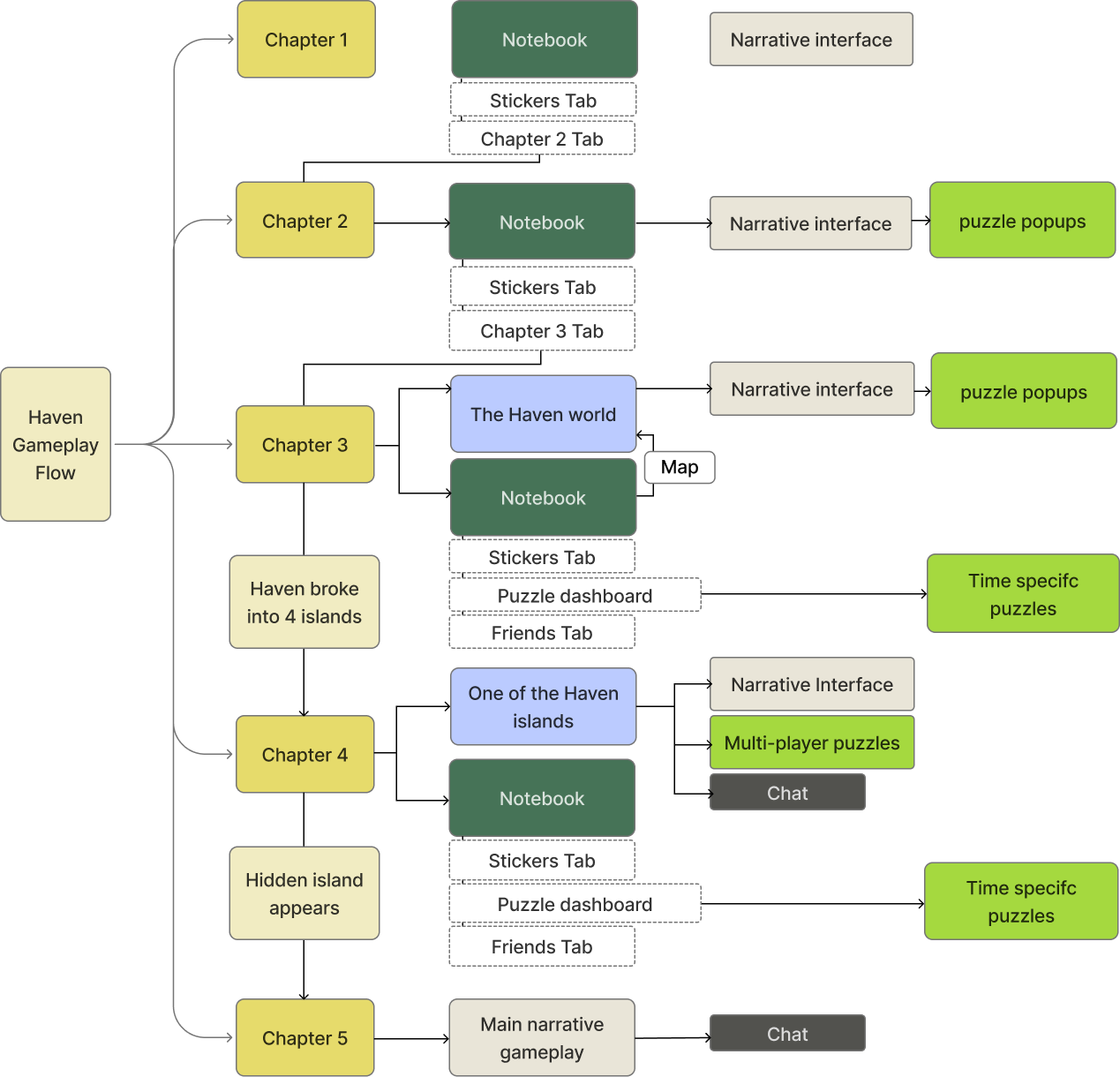
Product Logic Map
Working with the PM and narrative lead, I mapped each chapter's user goals, interactions, and required features to identify how the navigation system needed to evolve.
The UX Challenge

Understanding our player needs
After clarifying the game structure, I interviewed a few incoming students to understand what would make the experience inviting and worth playing.
2 contrasting player motivation
Interviews revealed two contrasting player types. The gameplay experience needs to remain approachable and intuitive for casual players while surfacing game depth for puzzle lovers
Puzzle lover
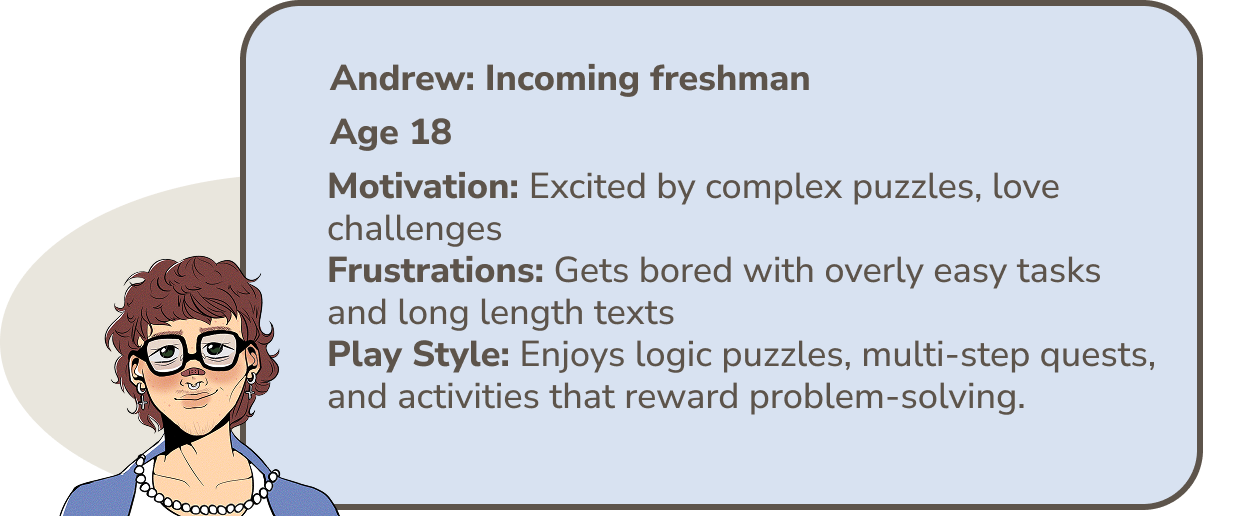
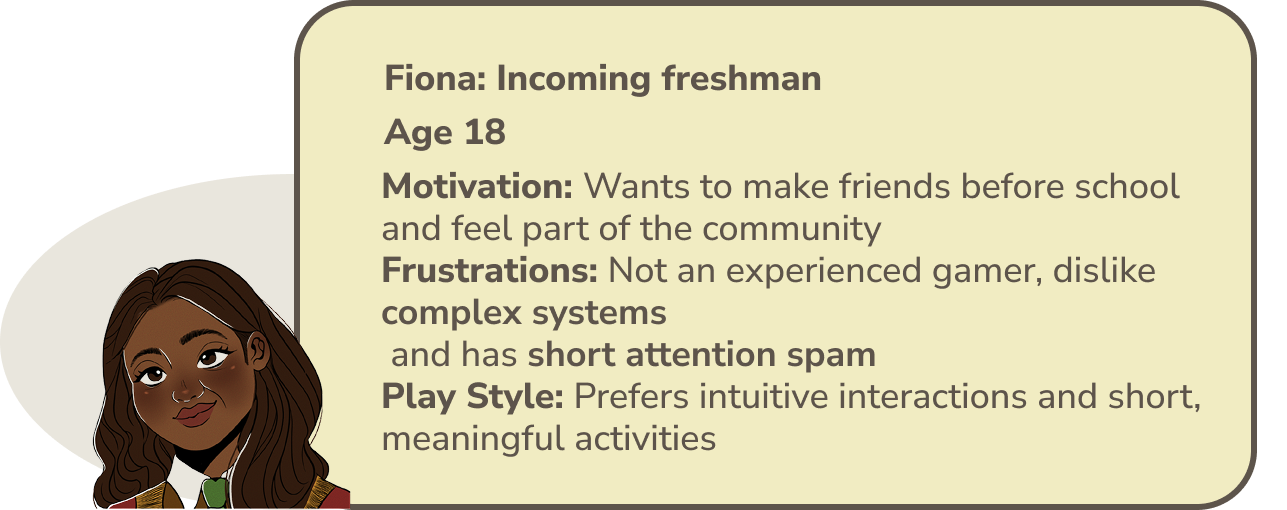
Social player
Design Synthesis
Combining user pain points, feature requirements and project constraints, I listed out my specific design goals as a game UX designer
The interaction system has to:
Flexible
Adapt across chapters with new mechanism without forcing players to relearn the game systemIntuitive
Make progress, available activities and next steps immediately understandableMotivating
Reward exploration and puzzle completion to encourage continuous gameplayVisually clear & cohesive
Give each island a distinct identity while maintaining clear narrative & puzzle layouts
Ideation
Wire framing & Iterative design
I map the game structure to the notebook system to explore how the notebook could scale with the game.
Chapter 1-2 introduced onboarding, chapter tabs, and rewards
Chapter 3-5 added maps, time-sensitive puzzles, friends, and multiplayer tools
Designing the game flow
Challenge: Each chapter introduced new features and interactions, but students needed one familiar place to navigate activities and know what to do next.
Solution:
THE NOTEBOOK concept: ONE SYSTEM THAT EVOLVES
Inspired by the idea of a “student notebook”, I created an in-world central hub that expands with the game, from onboarding and chapter navigation to puzzle access, friends, progress, and rewards.
Why a notebook:
Familiarity: The notebook metaphor feels immediately understandable to students
Flexibility: Gradually introduce new features without disrupting familiar navigation
Immersion: A natural fit with the academic setting

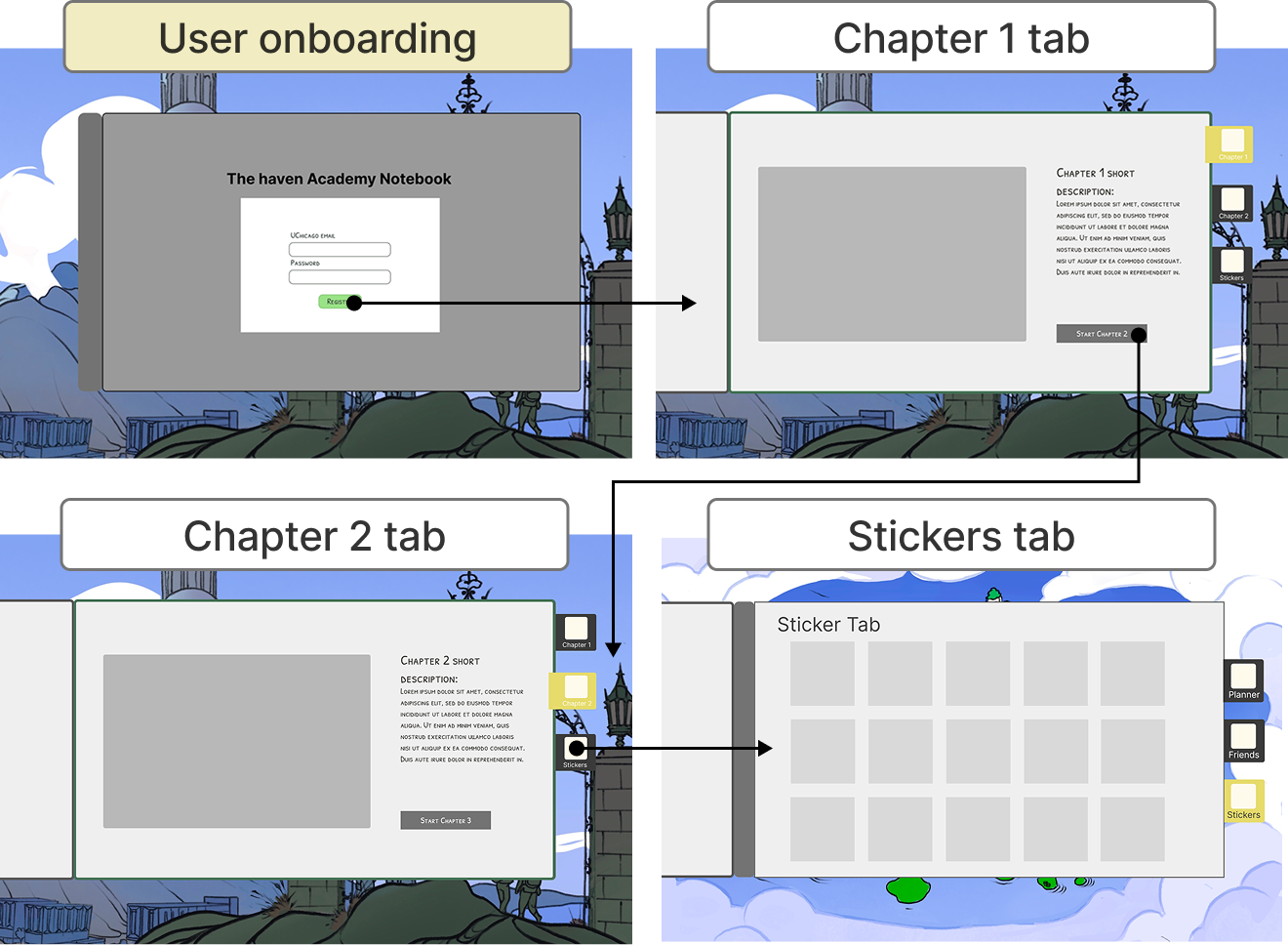
Chapter 1 & 2
Chapter 3 & 4
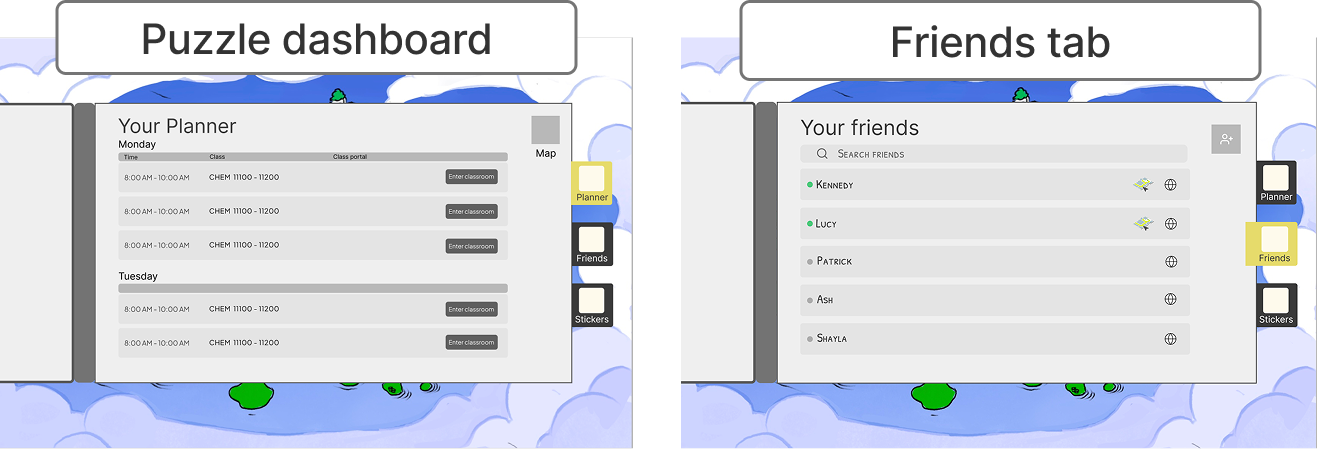
Creating prototypes allowed me to recognize inefficient flows within the interface and systems.Through iterative design, we recognized specific player pain points and significantly enhanced the gameplay experience.
From Planner to Actionable Dashboard
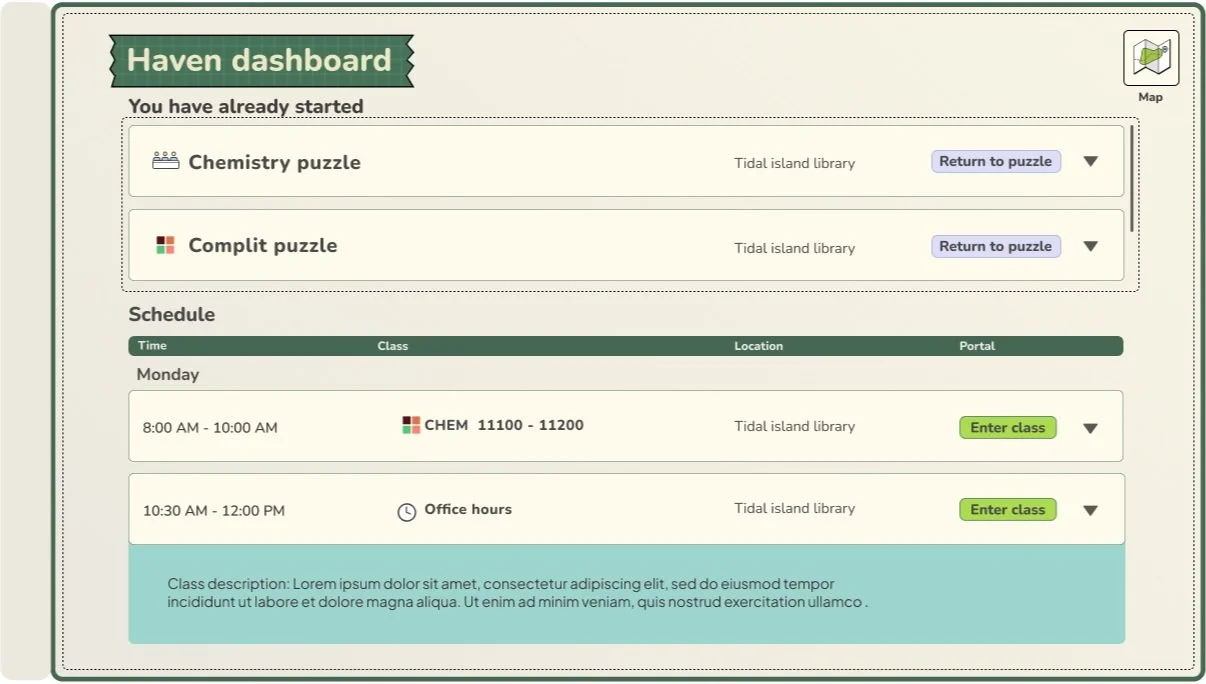
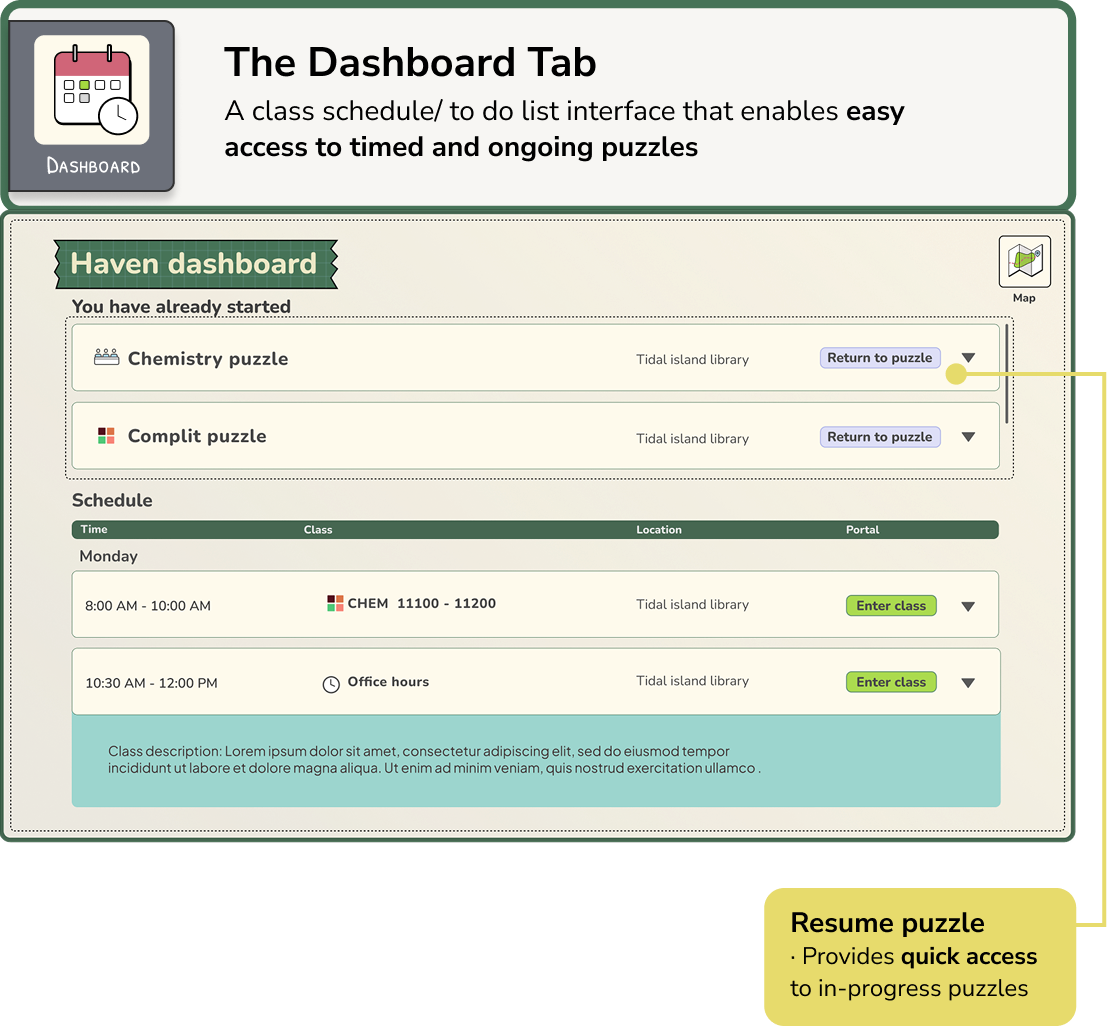
Prototype walkthroughs revealed a navigation gap: students couldn't easily return to puzzles they' opened without navigating back through the islands.
Iterative design:
Iteration:
I redesigned the planner into a dashboard with 2 key improvements:
Pinned unfinished puzzles to top for quick access
Introduced distinct icons to help students quickly identify and differentiate puzzles
Players can now quickly access unfinished activities without navigating backward through the islands and have a clear overview of all available time sensitive tasks.

Before
After
Building one visual language across four worlds
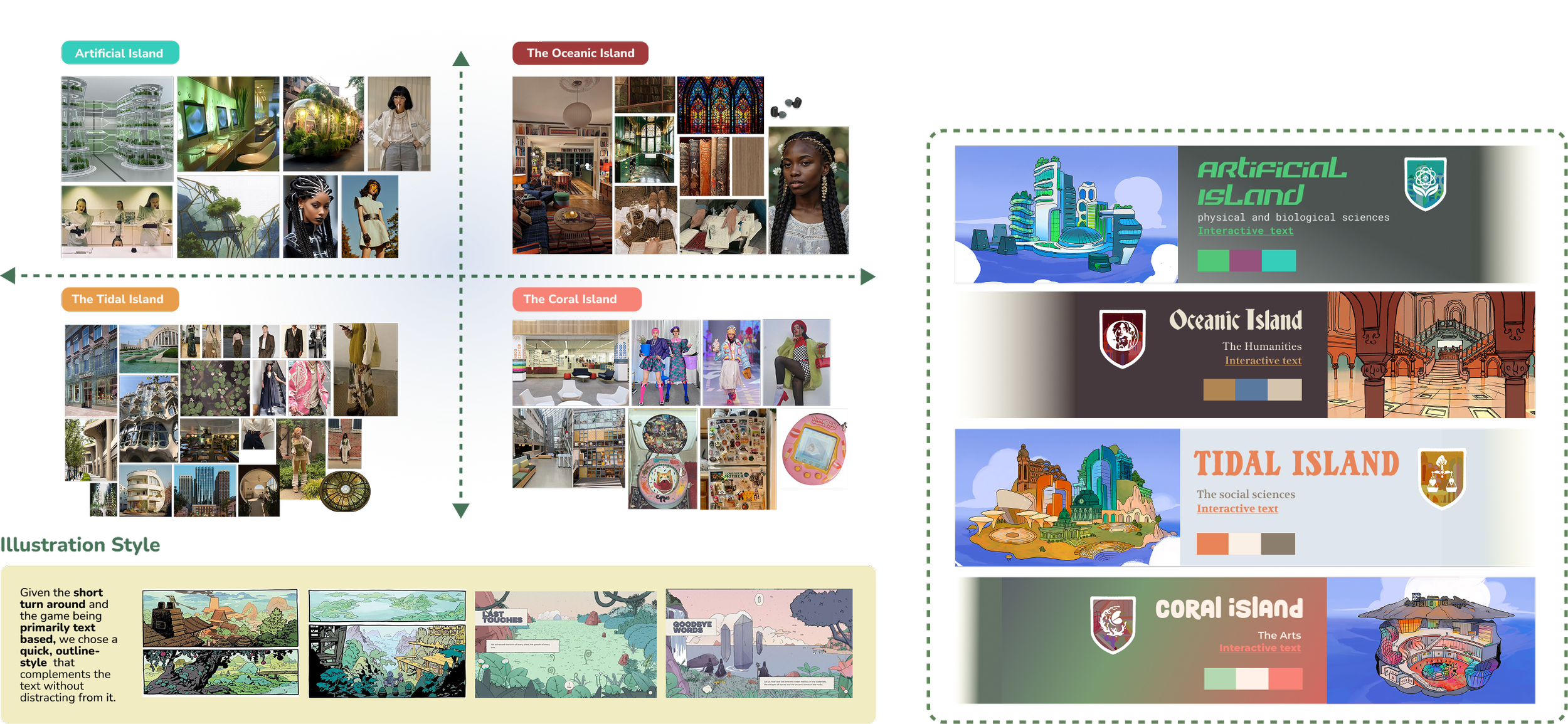
Core challenge: Four distinct island environments needed a cohesive visual identity, while teams have to work simultaneously under a tight timeline
I collaborated with the illustration team to establish shared guidelines for color, typography, and UI
The system ensures that the team can work simultaneously to create cohesive game visuals and allowed me to prototype Hi-fi interfaces quickly
What drove our decision:
For the players: We selected a clean, semi-illustrative stylesuited for college students (in comparison to eg. overly stylized, decorative or childish styles)
For the team: We chose a style combination based on the tight turn around and one that can be adapted well cross both illustrations and interfaces
Designing the narrative interface
How could the interface support long-form narrative without hiding the world players were exploring?

Optimizing text box layout
✘ The majority background is covered up and the text became less readable
Challenge: designing the narrative interface is that it needed to support 50–100 words of text while preserving the environmental artwork that made each island feel immersive
I tested three layouts to find the clearest balance between readability and visual visibility

✘ The background can be seen but the text box cannot support longer texts

✔ Has a dedicated reading area while keeping the game world continuously visible
Final Outcome
notebook system - navigation that adapts to student needs and narrative
Chapter 1&2 notebook system - User Onboarding & Game Introduction
The notebook in chapter 1 & 2 acts as a platform that allows users to set up their profile, fostering a sense of personalization & facilitate Chapter transition.
Chapter 3 & 4- Puzzle Solving and Exploration
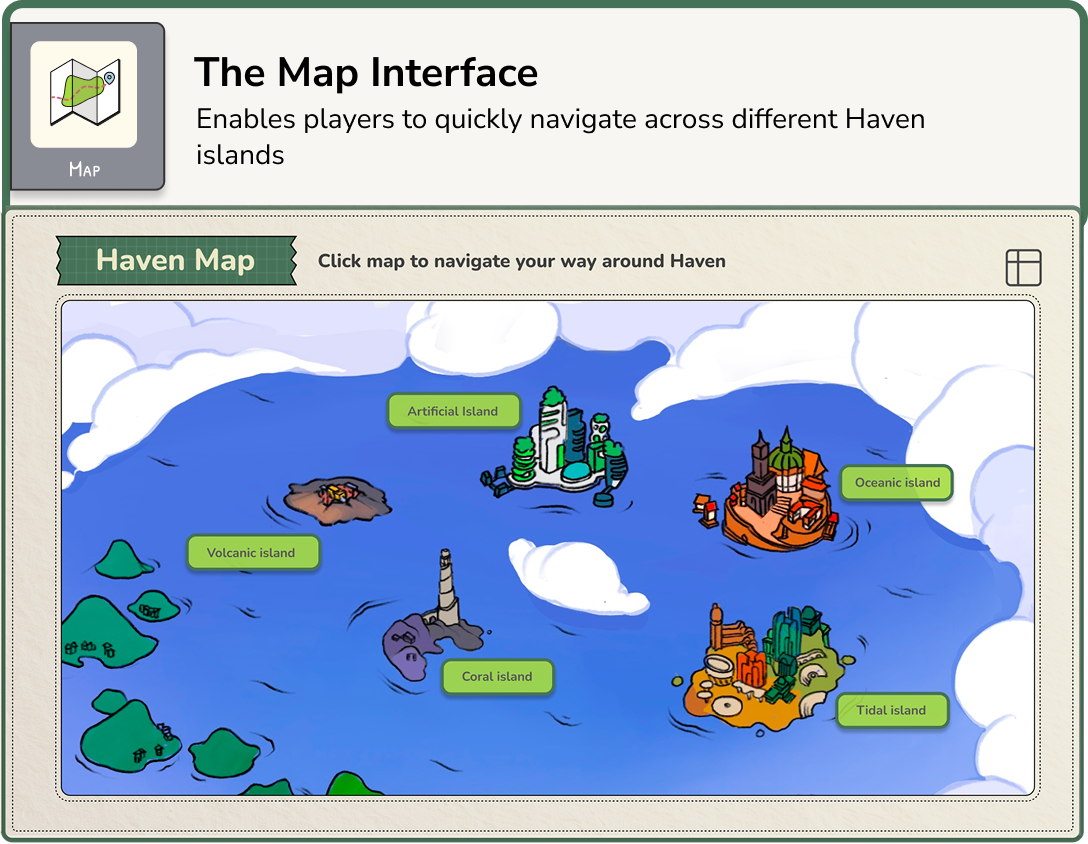
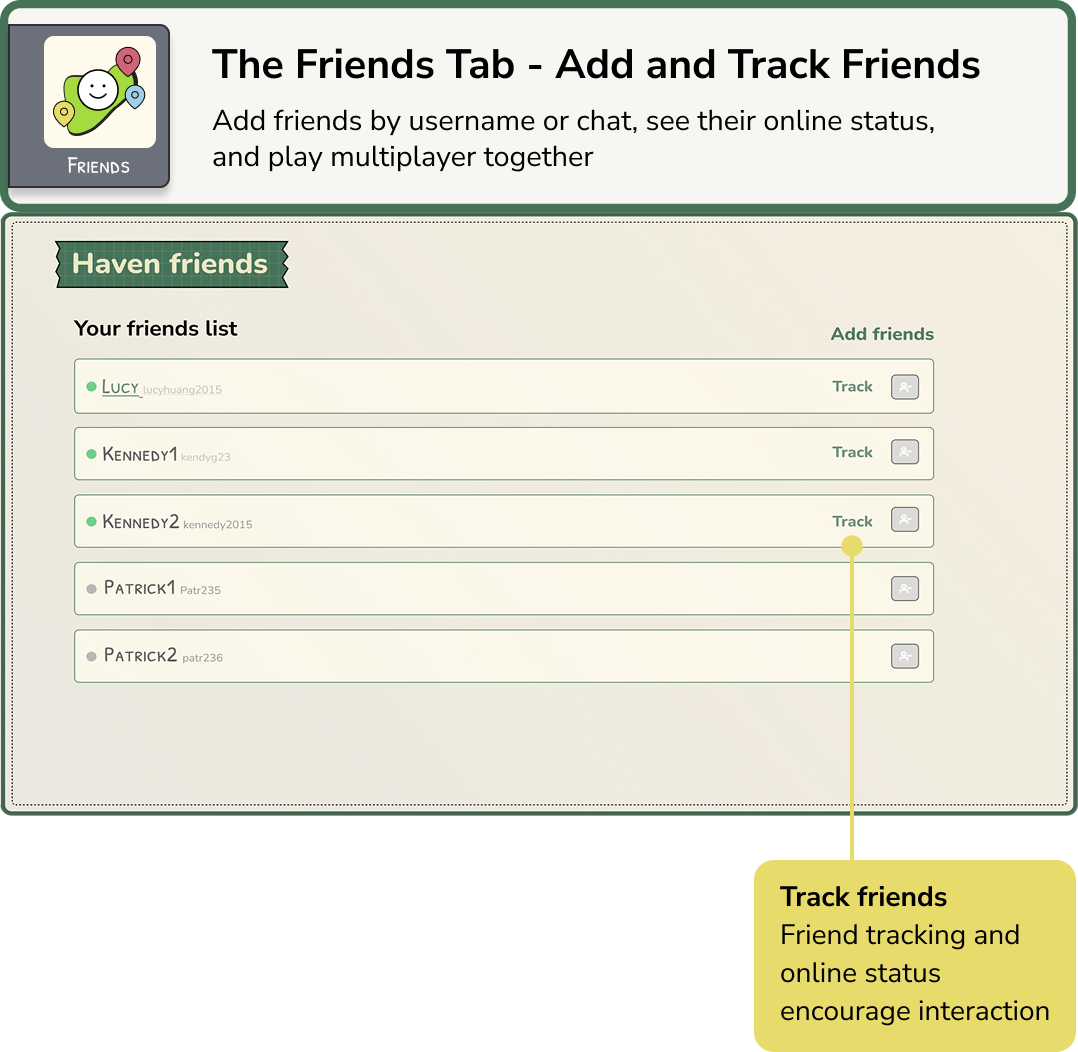
The notebook expands into a central toolkit for navigating islands, resuming puzzles, tracking schedules, and connecting with other players
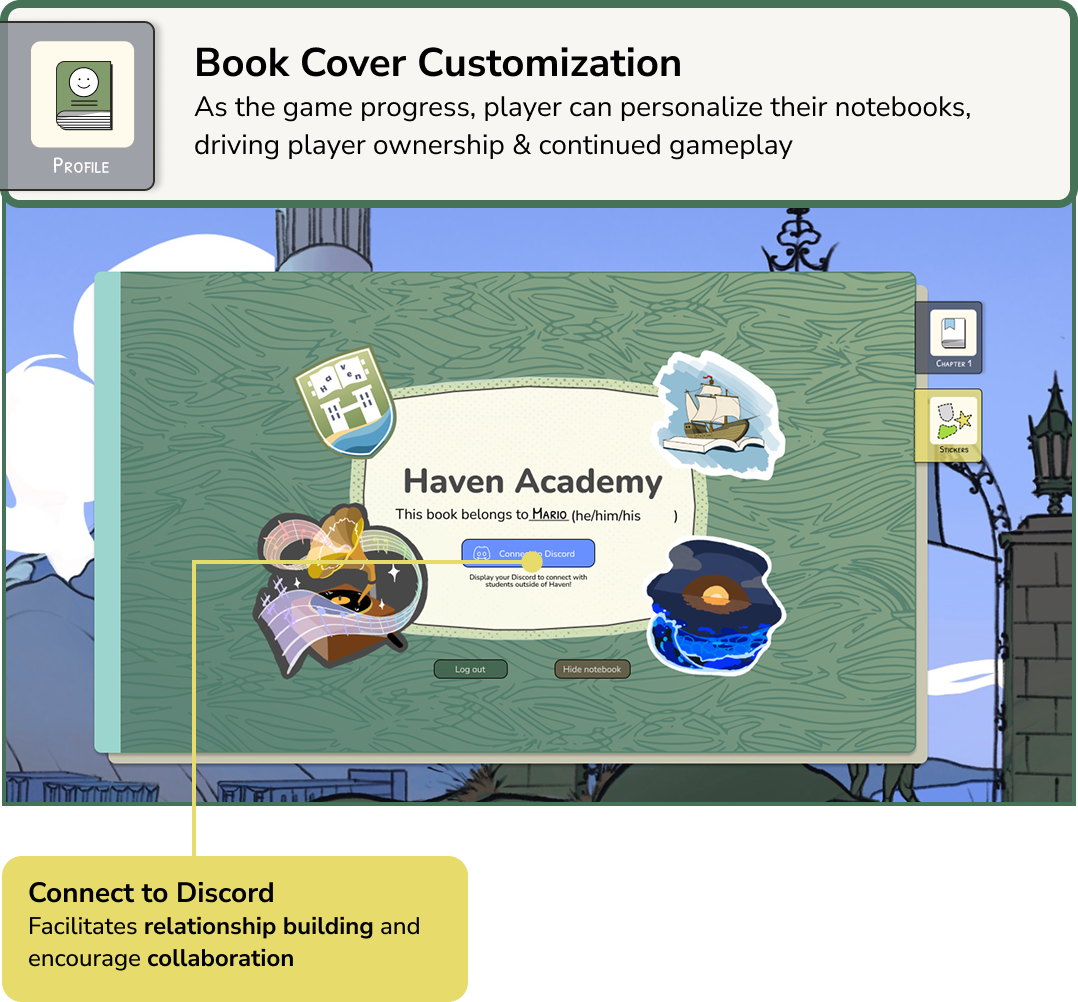
Notebook highlight: MAKING PROGRESS COLLECTIBLE
While the rest of the notebook enables navigation and functionalities, I designed the sticker tab to give players a reason to stay and keep playing. Players earn stickers as they progress through the game & puzzles.
The Sticker System
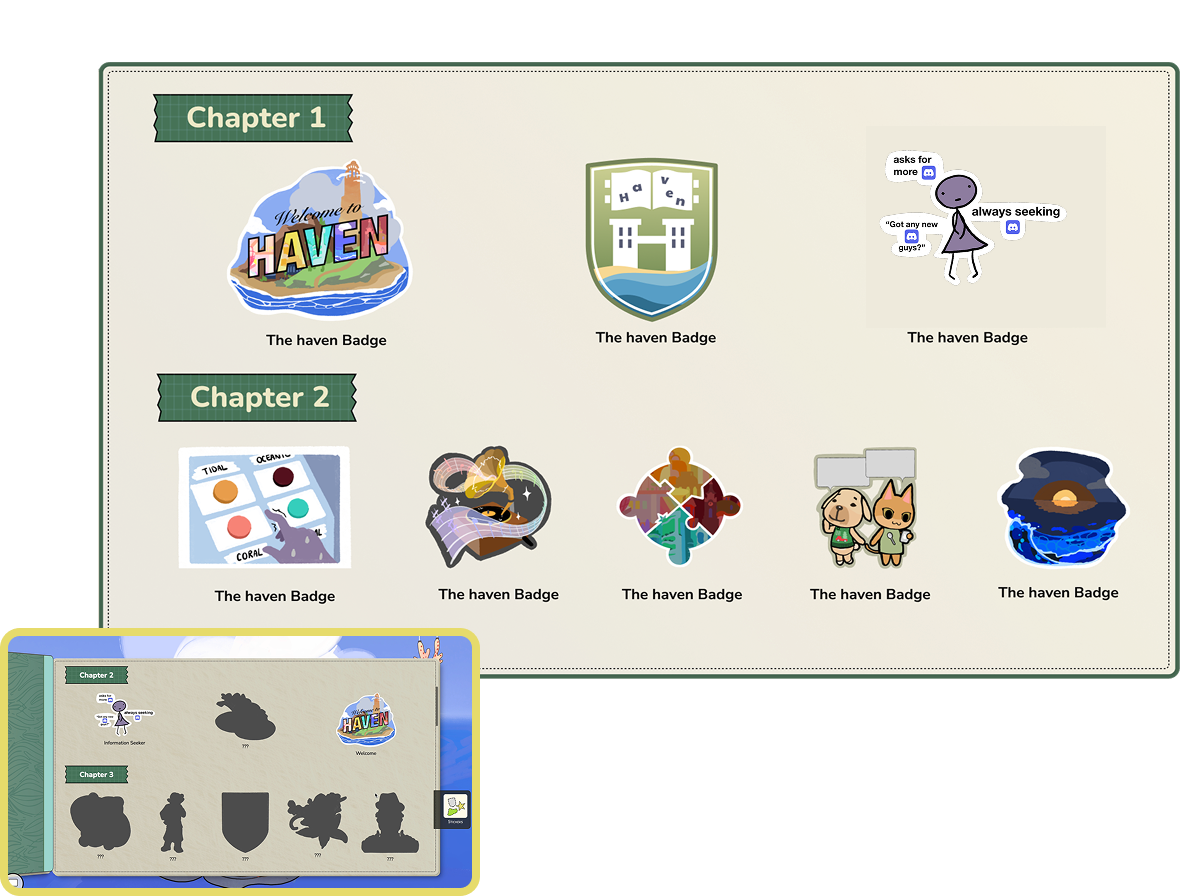
Spark Curiosity: Locked sticker silhouettes hint at future rewards, encouraging continued gameplay
Visualize Progress: A growing collection makes achievements visible and rewarding, boosting completionist drive
Enhance narrative branding: Stickers helps enhance game identity
Outcome
Puzzle completion increased by 20% following implementation, and students even requested physical versions of the stickers
A comprehensive Narrative interface
After standardizing the basic layout, I designed high-fidelity narrative interfaces reflecting each island's distinct characteristics, following design guidelines shown earlier.
For Chapters 1 and 2 for instance, I incorporated notebook-inspired elements like ink splashes and bookmarks to reinforce the narrative of the island’s academic and notebook theme.
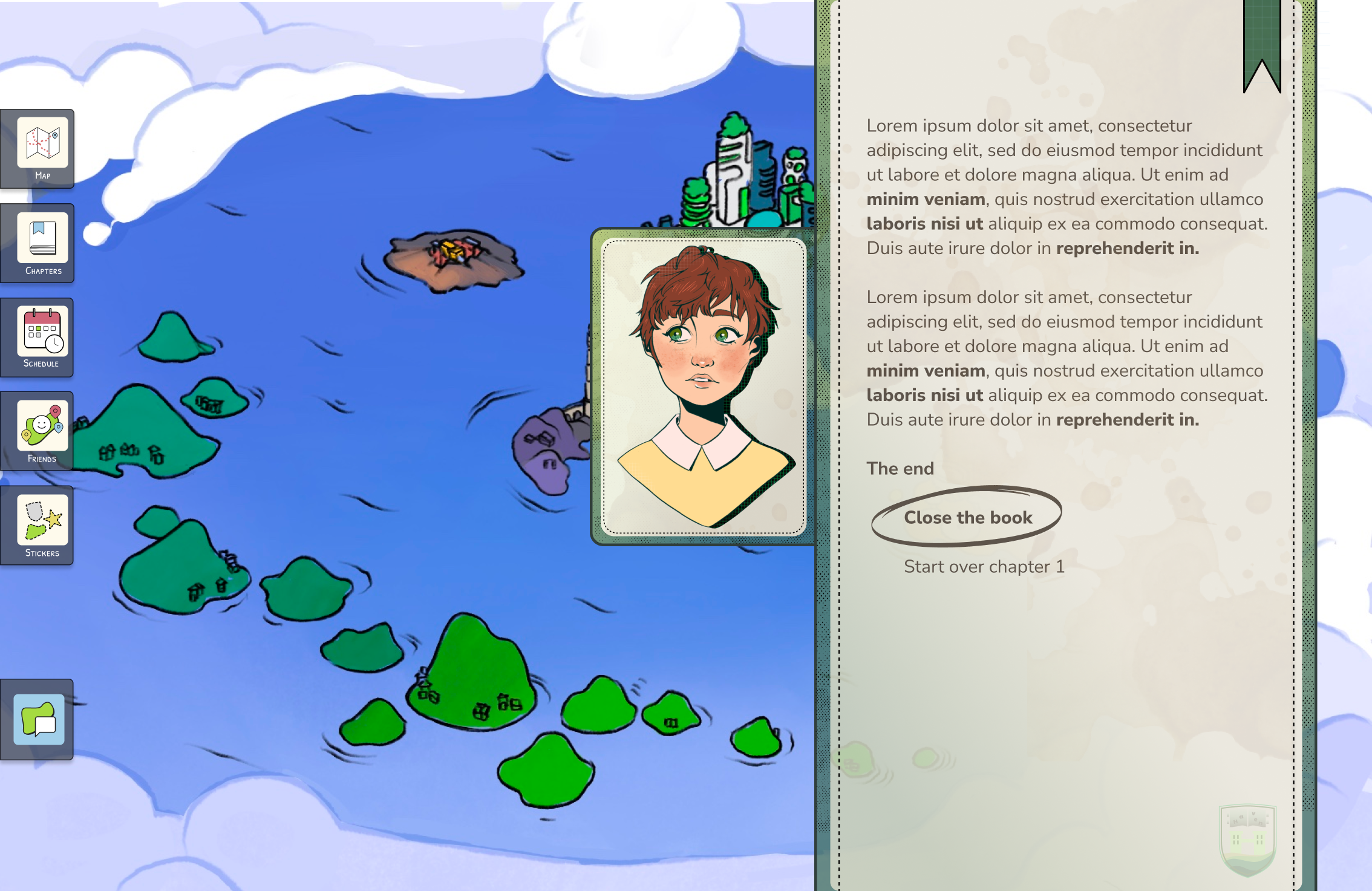
I designed and optimized the narrative and puzzle interfaces to align with the game illustrators' style, while reflecting each island's unique characteristics and narrative.
high-fidelity Interface highlights

Coral Island-The Arts
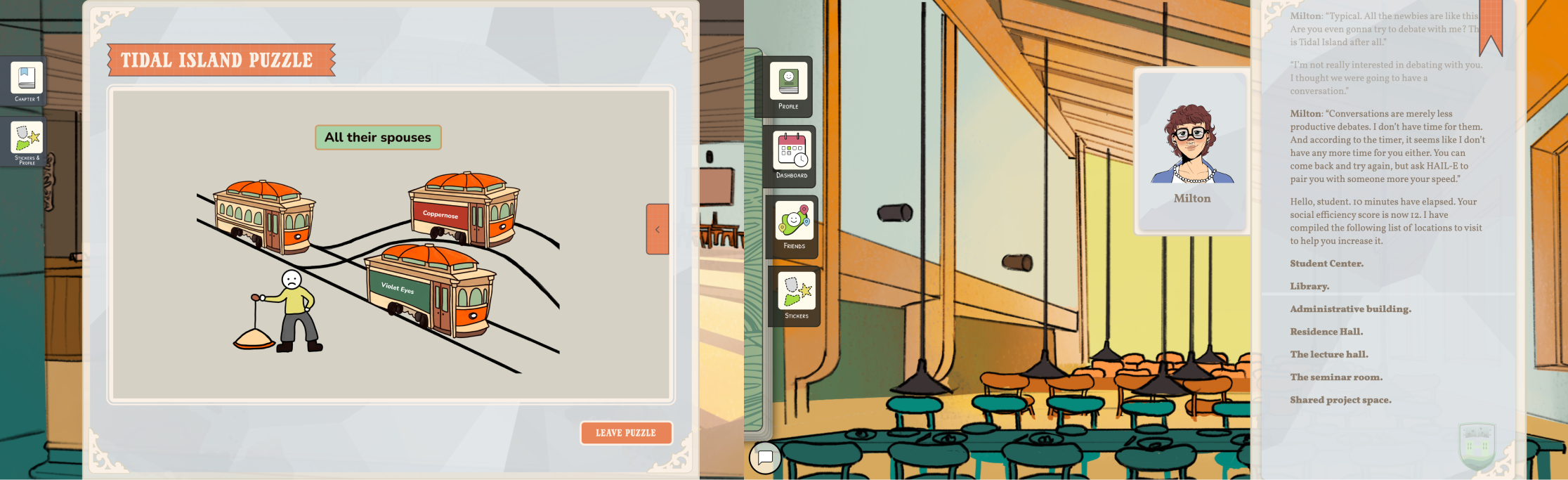
Tidal Island-The Social Sciences

Artificial Island-The Math & Sciences

Oceanic Island-The Humanities

Beyond interface designs, I also illustrated a series of art and puzzle assets:
Key Takeaways
Cross-Functional Collaboration: Aligned narrative, design, and engineering goals across a 20-person team while navigating technical constraints
Design-to-Development Handoff: learned to create clear, adaptable design specifications to support smooth engineering implementation
User-Centered Iteration: Led multiple user testing rounds and developed a sharp eye for iterating based on feedback
Storytelling Through Design: Explored how thoughtful interactions can go beyond functionality to drive brand storytelling and create engaging, cohesive experiences
Amazing mentors and peers!
Wishes
Design more detailed UI/UX for the mini games
Extend play tests to analyze specific game points that diminishes player motivation and implement specific solutions and adjustments to tackle them
Reflection
The final game system gave players one consistent place to navigate chapters, access puzzles, connect with peers, and motivated continous gameplay. Students came back to campus asking for the physcial stickers from the sticker tab. Additionaly, the interface designs gained positive reviews across faculty and students.