
Vitals
A Health Measuring & Coaching ios App
Challenge
Transforming a B2B health measurement tool into a B2C personalized health companion designed for long-term engagement
Product Manager
UI/UX Designer
Roles
Data and information visualization
User retention and habits building
iOS app development
Product positioning & onboarding
Personal Goals
Timeline
2 Months
Competitor analysis
Wireframe & prototyping
UI/UX App design
Data visualization & information architecture
AI integration strategy
App onboarding design
Responsbilities
Tools
Figma
Project Summary
With a mission to make healthcare more accessible, Vitals uses AI-powered computer vision to measure vital signs through any camera-equipped device, without wearables or additional hardware. The company sought to expand its existing B2B technology into a consumer-facing product.
As the PM and designer designing their first consumer facing product, I ran user interviews, journey mapping, and competitive analysis to identify barriers to trust and retention. I defined product strategy that prioritizes long-term engagement through personalized insights, actionable guidance, and habit-building features.
Working with the engineers, I delivered the end-to-end flows with 30+ iOS screens and built our first full beta.
Process highlights
User & market Research
We have the technology, but how can we turn it into a valuable product for consumers?
I dived deep into user and market research: conducting interviews, collecting existing user feedback, and testing of the original product to understand users’ health goals, existing frictions and expectations

Discovering and understanding pain points
Through exploring our user database, reviews and interviews, we discovered two recurring barriers:
User journey mapping
Lack of trust: Users questioned the credibility of camera-based vital-sign measurements
Loss of motivation: Users saw little reason to scan regularly unless they are monitoring a condition or have an immediate health concern
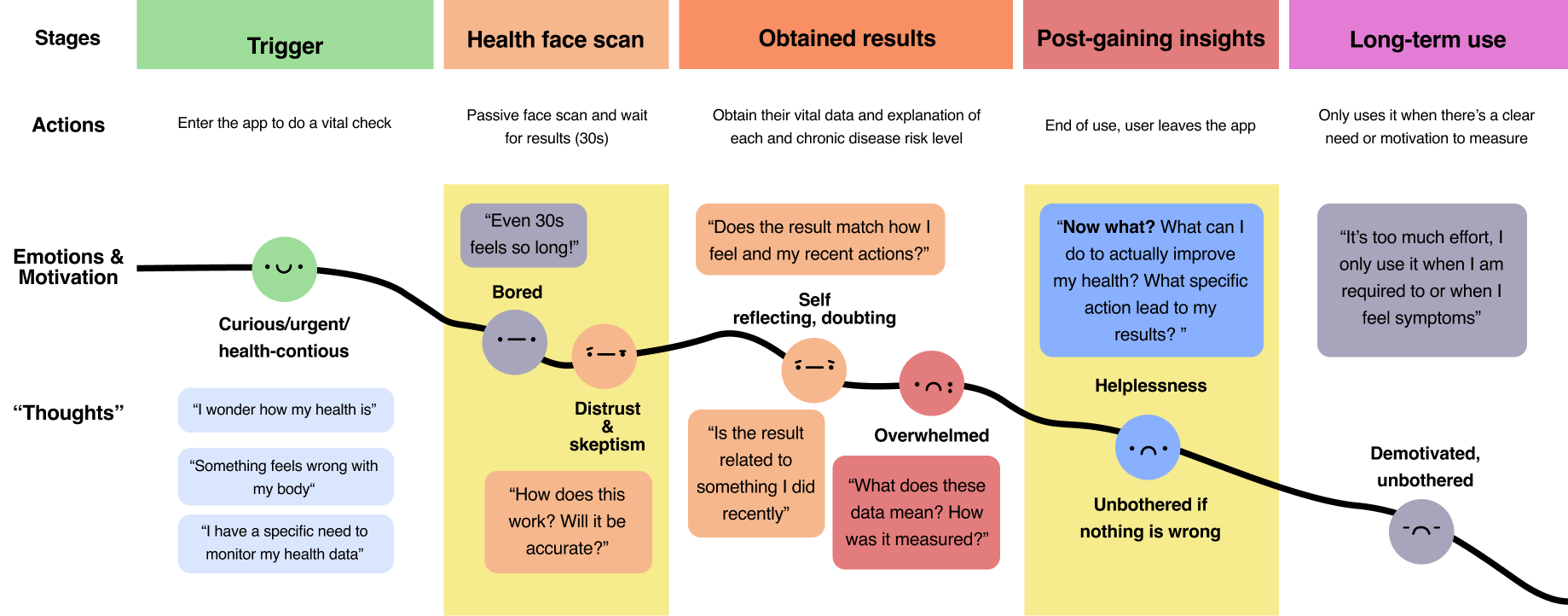
what exactly caused these issues? We dived deeper into the problem
To understand where trust and motivation declined, I tested the original product and mapped the end-to-end user journey
Insights
Walking through every step, we found that:
Trust declined during the face scan
Unfamiliar measurement method
passive waiting period
limited system feedback
made users question how the technology worked.
Motivation declined post-gaining results
Users are overwhelmed by:
Complex data without enough interpretation
Lack of actionable guidance
Lack of long-term motivation
Through these insights, I mapped out the core needs at every touch point:

Competitive analysis
Next, to validate my findings from user journey analyses and uncover gaps in user needs and market opportunities, I explored how existing solutions approach core functionality and where our app can deliver greater value and maximize impact.

Key insights
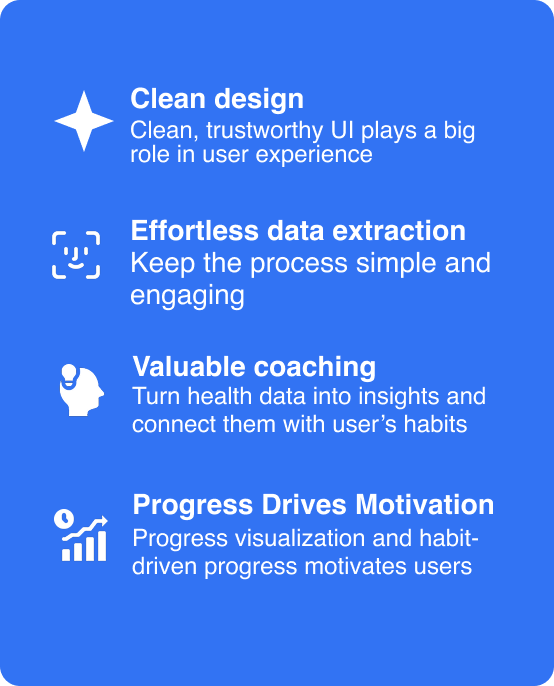
Design strategy
Direct competitors: Capture health data but explain them poorly and few make efforts to build user habits.
Successful fitness/ wellbeing apps: puts heavy effort on functionalities on habit building and boosting motivation. However, they all rely on broader ecosystem or additional devices
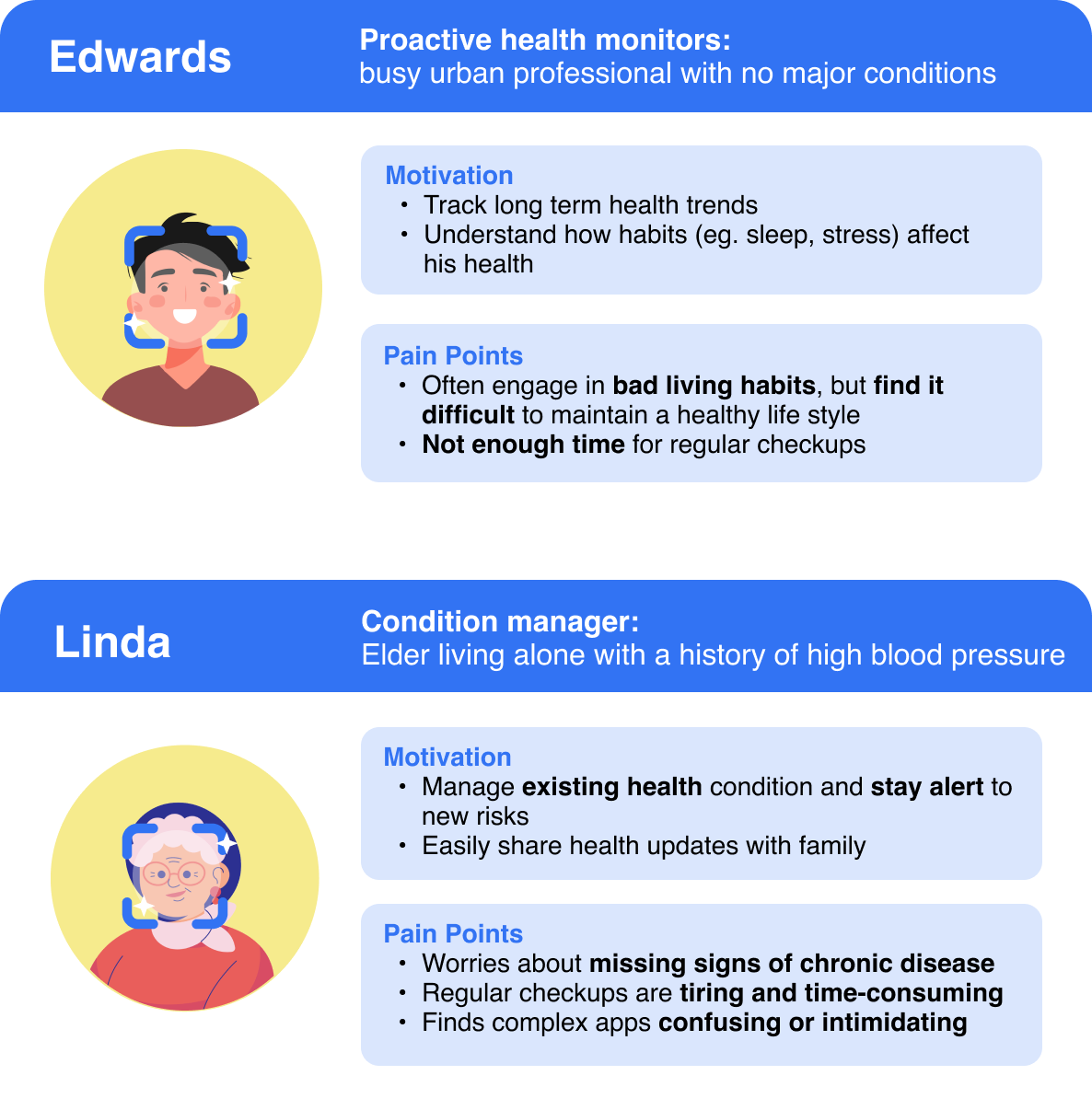
User segment and prioritization
prioritization
Primary user segment: Proactive Health Monitors
Among the two user segments, I decided to prioritize this group for the initial consumer product for three main factors:
Secondary user segment: Conditions Manager
1. Greater unmet need
The existing measurement tool already supported condition managers’ immediate need to check and monitor known health risks. In contrast, Proactive users received little value beyond a one-time scan.
2. Stronger alignment with the product market gap
Their preventive goals aligned closely with the market gap in accessible vital-sign measurement with personalized wellness guidance and habit support.
3. Higher potential for repeat engagement
Features such as trend tracking, actionable insights, and habit formation could give proactive users an ongoing reason to return, even when they did not feel unwell.
I believe that this segment still remains valuable and their core unmet needs such as family sharing should remain a feature that the product should fulfill
Beyond common user pain points, two core user groups emerged:
The two groups approached health monitoring with different goals, highlight the two core product value: preventive wellness and condition-management
Ideation
Product goal:
Create an experience users could trust, act on, and return to.
Through user research, journey mapping, and market analysis, I broke down the key barriers of trust and motivation into two core parts of the product experience:
1. the face scanning experience
2. post results experience
Synthesis

Mapping out the app architecture
After competitive research and clarifying my goals, I gained a clear idea of the main components of the app. I created a user flow map that lays out the structure, feature and content involved in each component, which was later further optimized to ensure objective of the app is achieved.
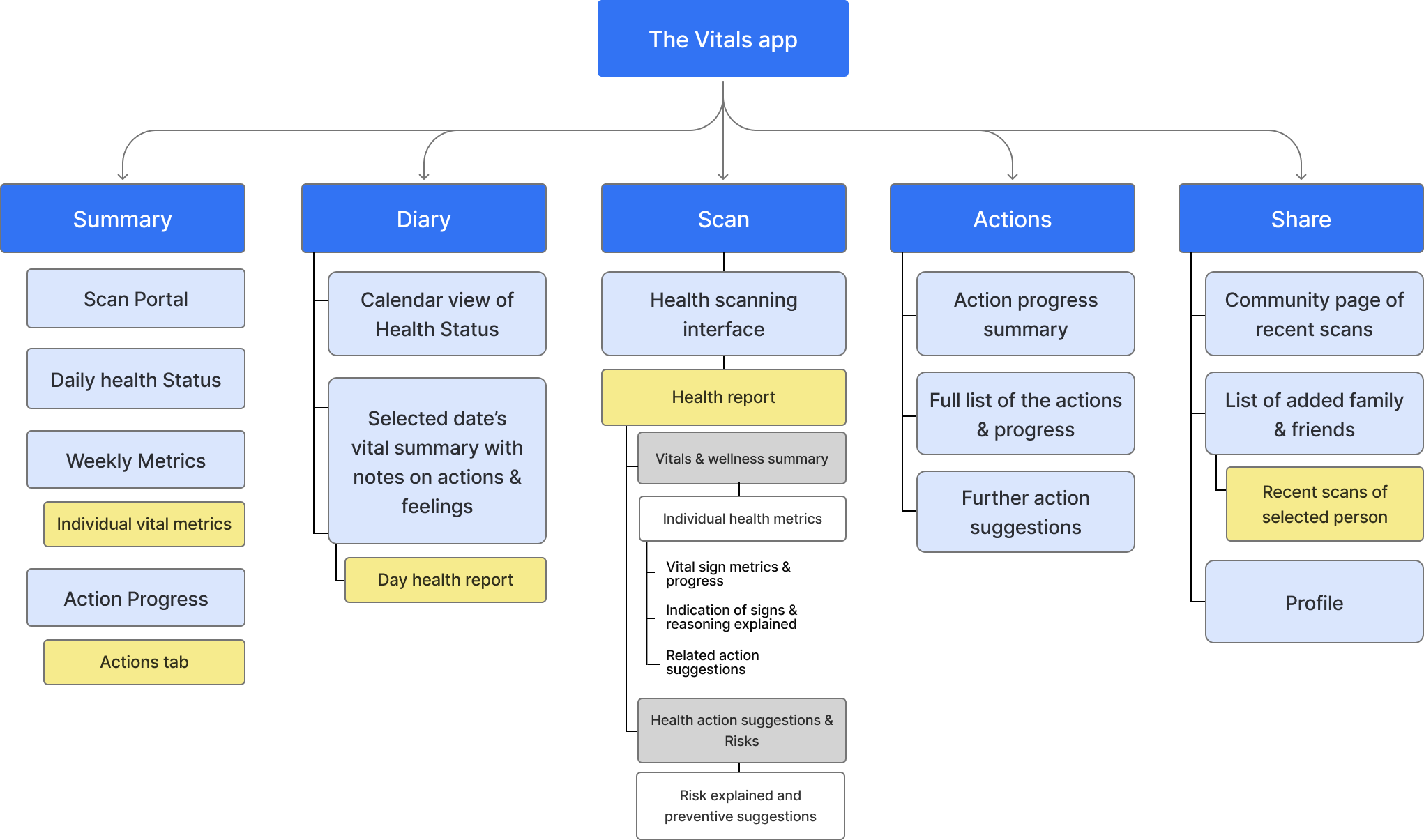
The summary: Provides an accessible, visual snapshot of health metrics, trends, and progress.
The Diary: Connects health data with daily actions, notes, and feelings to make insights more personal and comprehensible
Scan: The main portal to the vitals sign measuring technology and access to the health report
Action:Translates results into recommendations and provides habit tracking tool
Share : Helps users share updates and monitor the health of their trusted family and friends
Wireframing & Iterative design
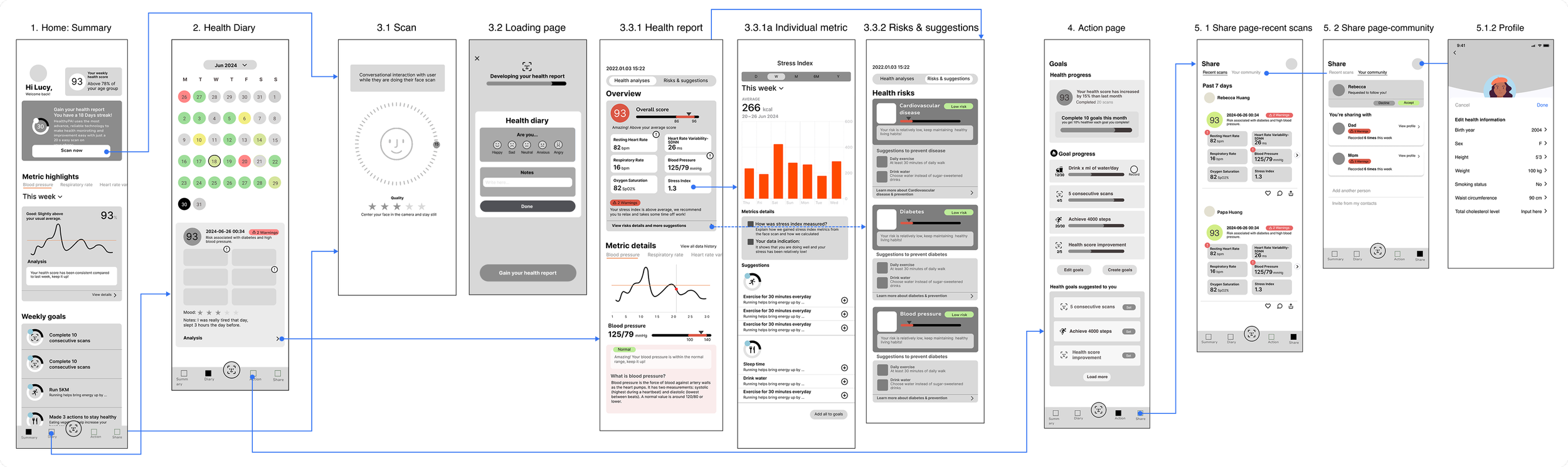
Early end-to-end Mid fidelity wireframe
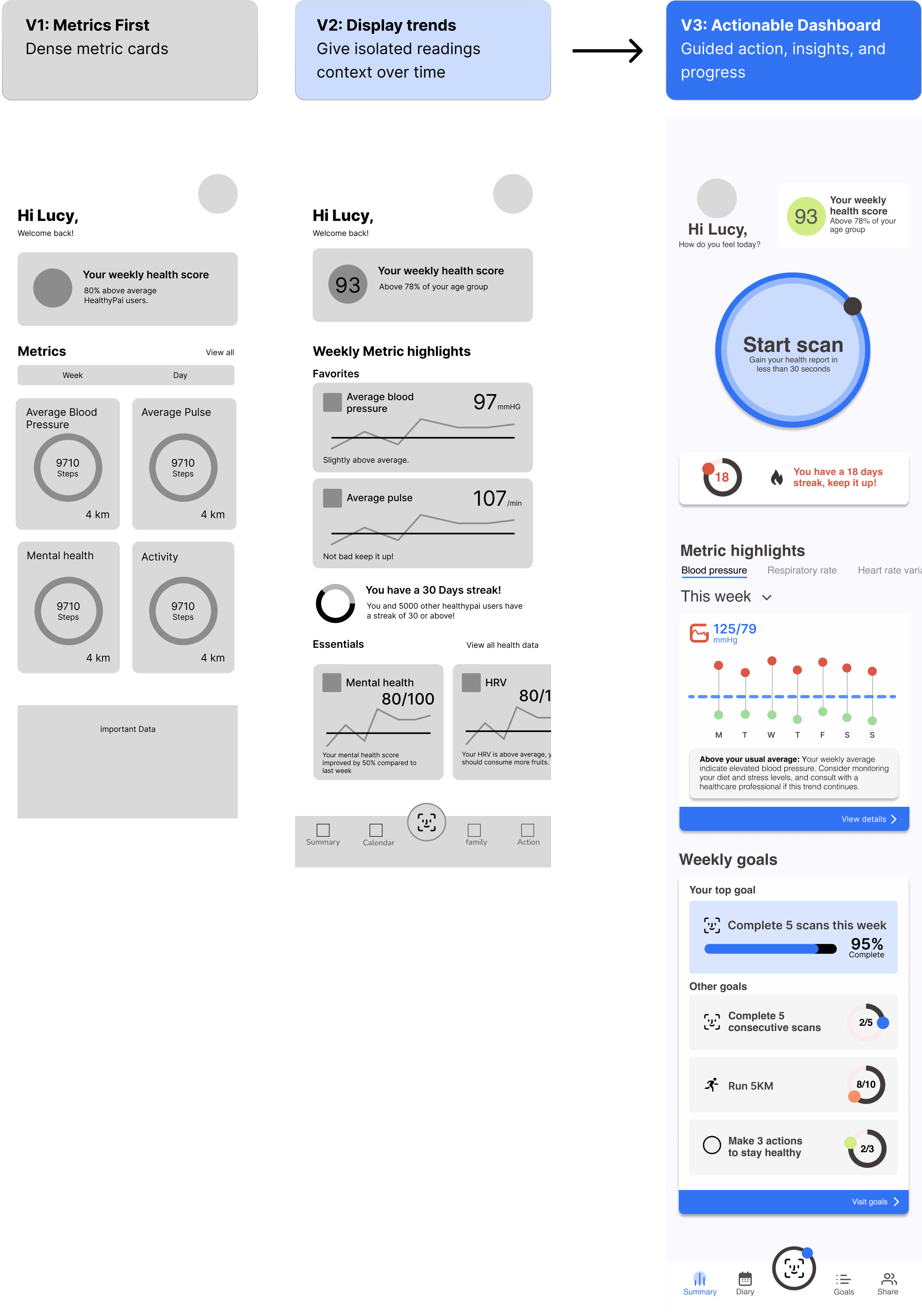
Iterative Design: From Data-Heavy to Action-driven
How might the home screen encourage repeat scans without overwhelming users?
I reorganized the dashboard around three priorities:
Effortless Scanning: Made the 30-second scan the most prominent action.
Clear Health Insights: Make health trends easier to understand by emphasizing clear progress patterns over isolated daily metrics.
Continued Motivation: Integrated scan streaks and weekly progress to encourage repeat engagement.
With the product structure defined, I created mid-fidelity flows to test whether users could easily begin a scan, understand their health, and identify what to do next.
The final dashboard balances clear, actionable health information with consistent calls to action
Early versions presented too much information at once, making the primary action and key trends difficult to identify.
Introducing my Solution
App branding Through Storytelling
Beyond focusing on functionality, I also paid attention into creating a cohesive app identity.Specifically, my design choices are driven by the goal of enhancing app credibility impression while creating a comfortable user experience.
I took aesthetic inspiration from high credibility platforms like Health/hospital and Banking websites and apps. Additionally, to capture our primary user segment, the proactive monitors, who are often young and health contious, I made sure the style feels young and refreshing.

High-Fidelity Interfaces
The face scanning interface
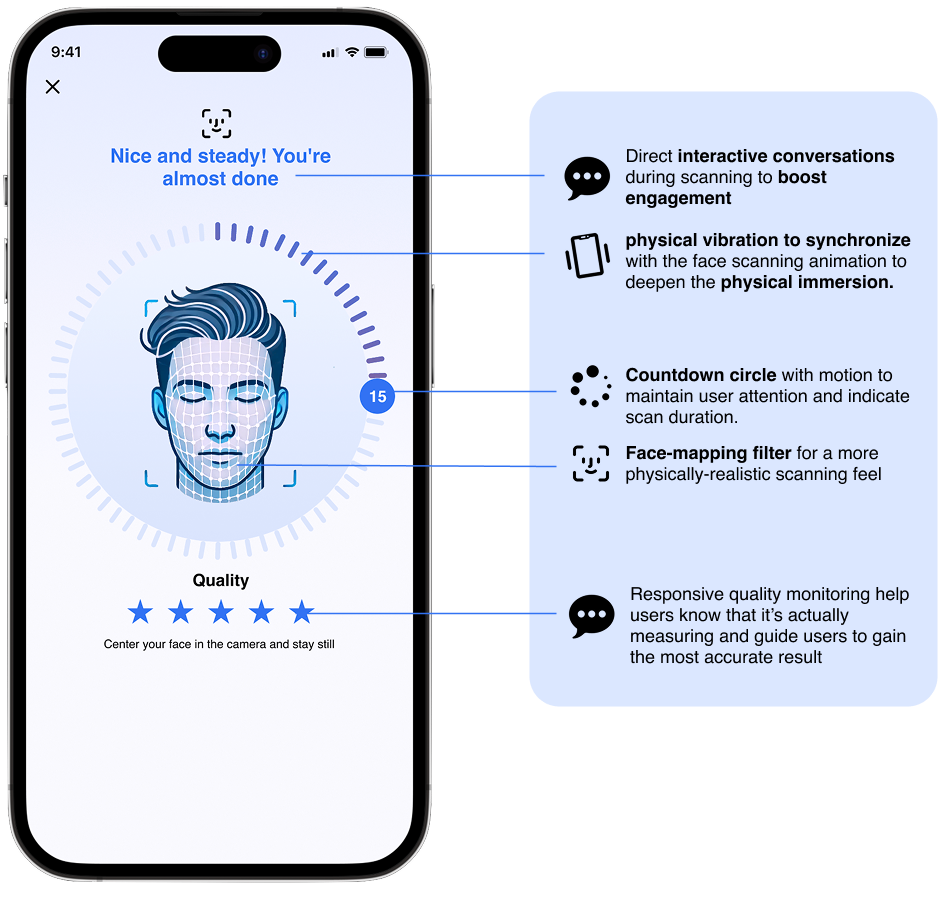
Improving credibility & user engagement through a physical health Scanning experience
Home page

Boosting User motivation & retention:
Emphasize health progress and habit goal display to create a rewarding experience that encourages consistent health monitoring.
Accessible Information Architecture: Overwhelming data also discourage users!
The information architecture is constructed to give a clear, simple overview of user’s health progression and highlight abnormal values.

Health Diary
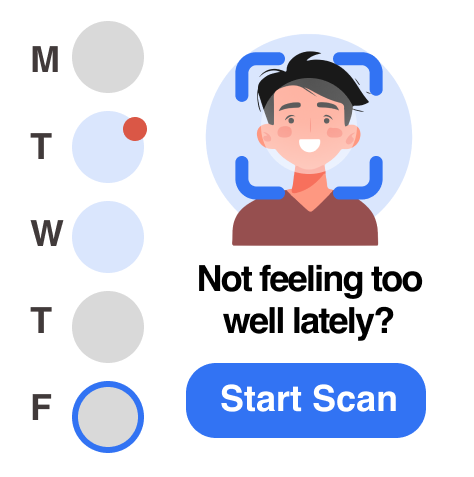
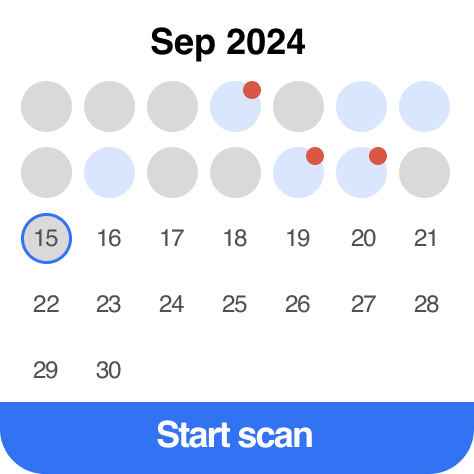
To further motivate users, fostering a personal connection is key.
The Diary feature enables users to link their real-life experience and activities with their health data, enhancing user-app interaction.
I designed widgets to further drive user retention and motivation through showing urgency and sense of progress.
Widget Design
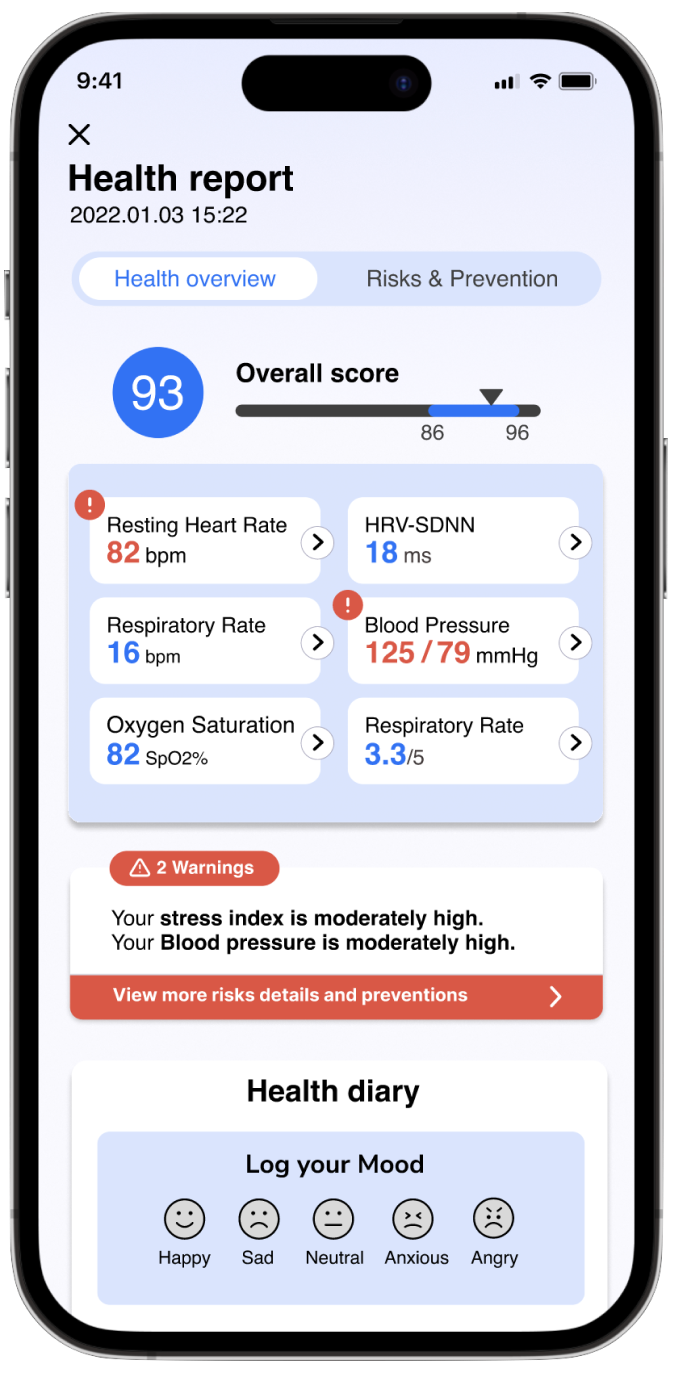
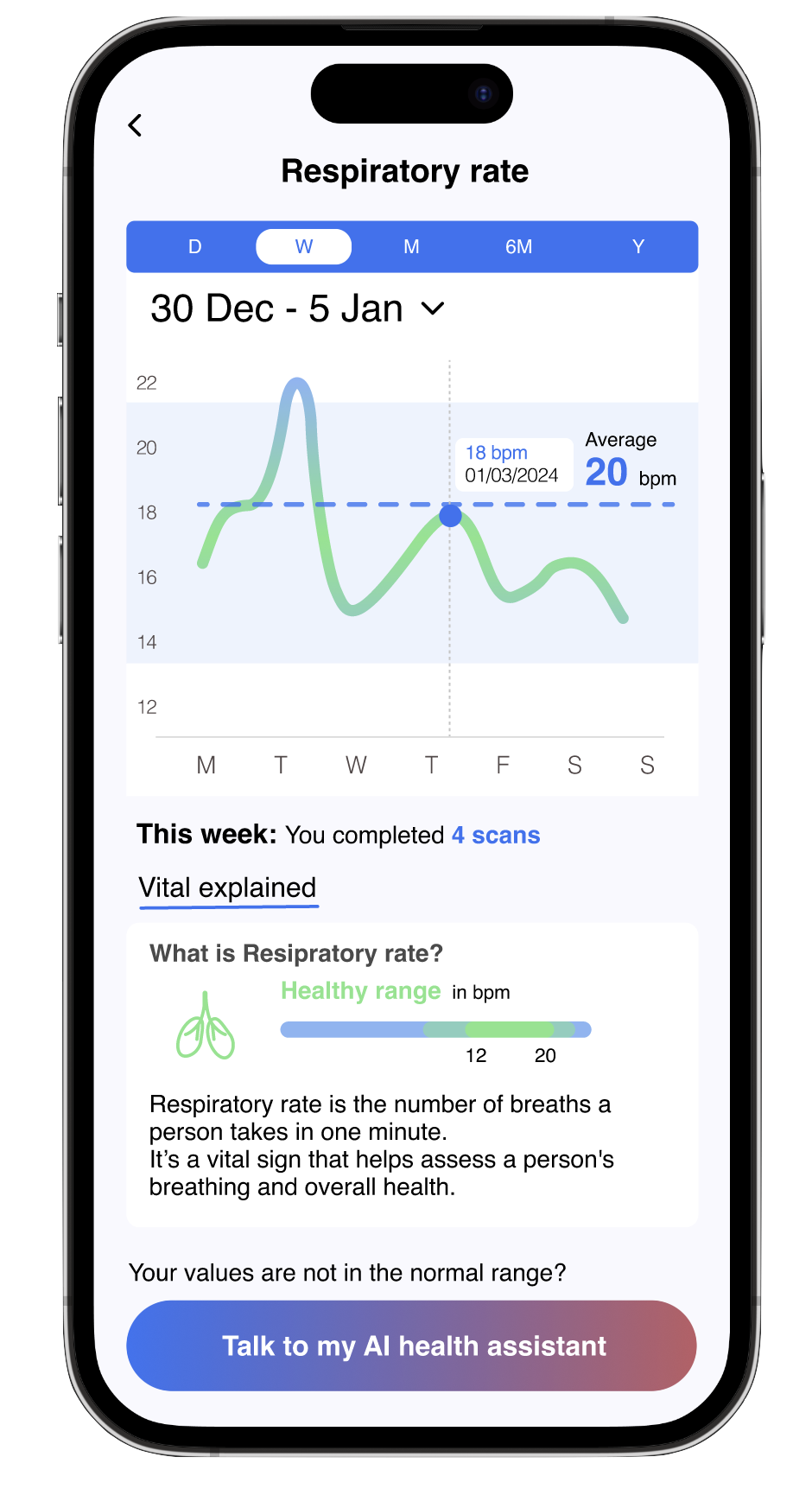
Clear and comprehensible Health Report
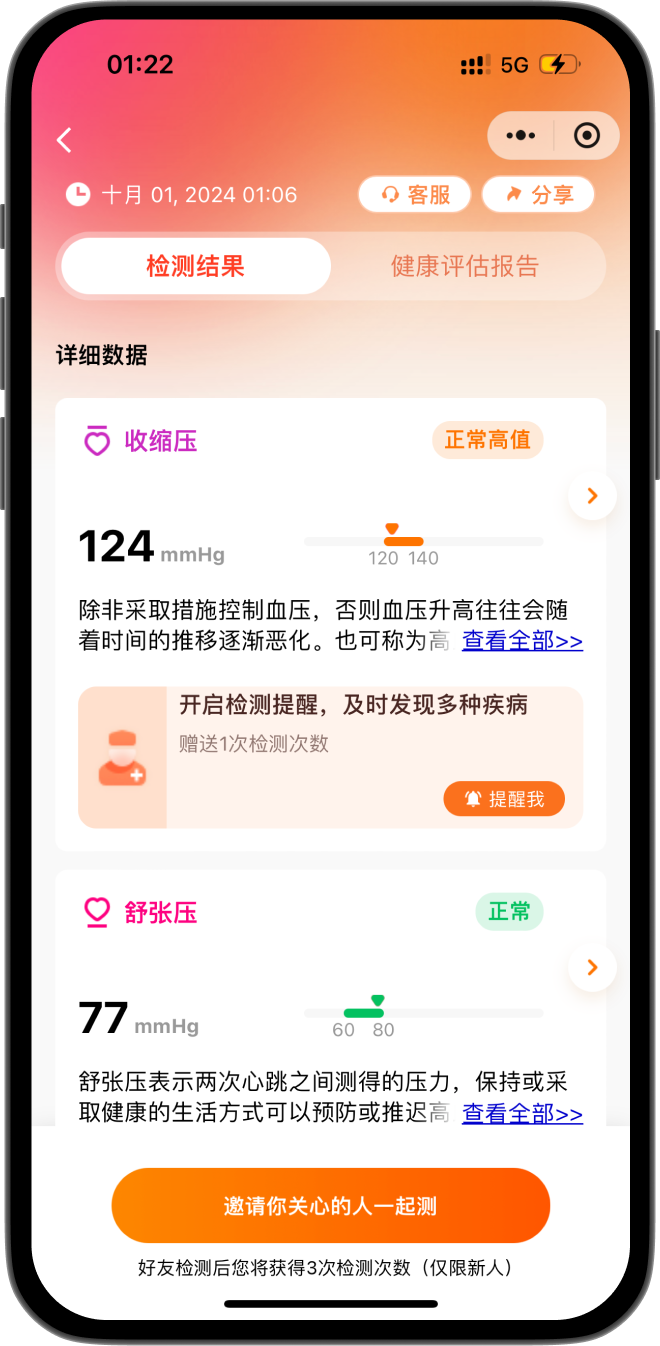
The original B-type product displayed vital signs in list form, the long scrolling makes data overwhelming and hard to grasp quickly.
To streamline data comprehension, I optimized the system to a data table where users can gain a clear overview of their vital signs and linked them to secondary pages that offers deeper insights.
The Action feature: Forming User Habit

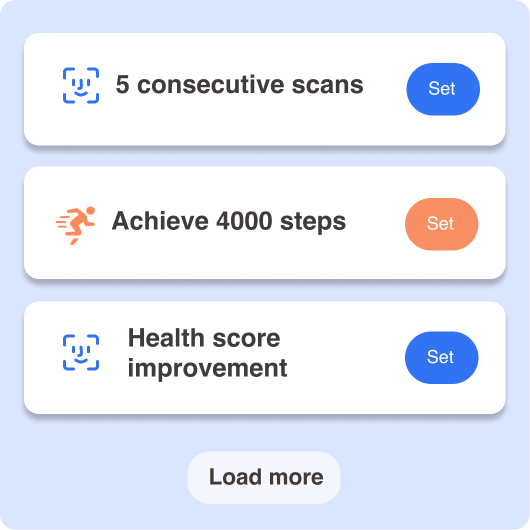
One main feature of the app that differs it from the B-End product is the Action feature, we are making a product that is beyond a static tool, but an interactive experience.
In order to form user habit and retention, we want to take health monitoring one step further from enabling users to simply understanding the data, but actually make actions for them.
Suggestions and actions are provided throughout the interfaces in direct relation to user’s health data, offering a more personal experience.
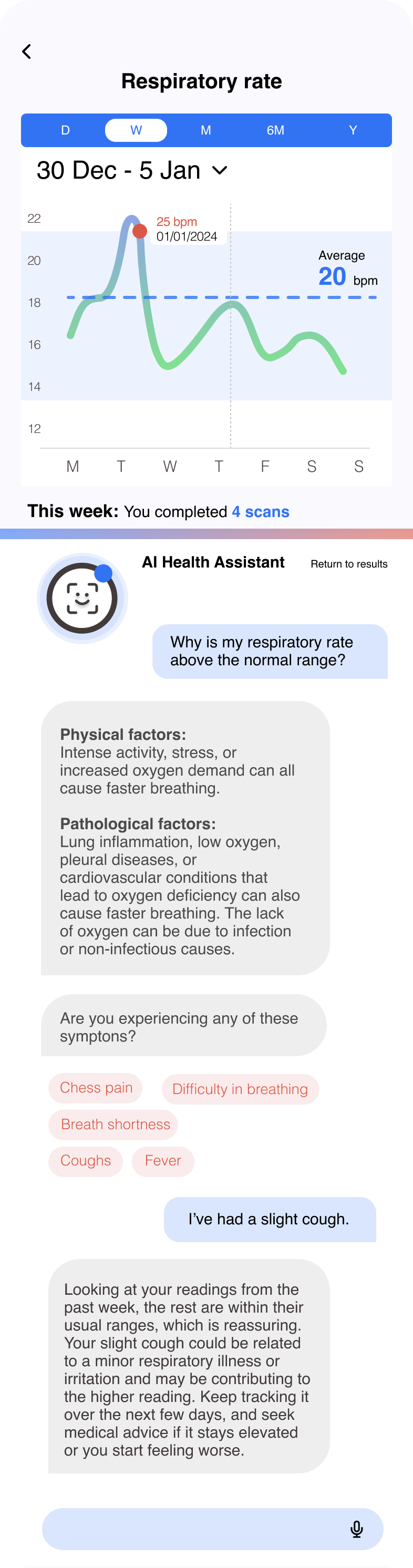
AI Health Assistant
Understanding data with personalized insights & guidance
With AI capabilities, users can chat directly with their health assistant when reviewing a vital sign or warning to understand possible causes, holistically assess risk based on long-term trends, and get clear next steps.
Designing the product launch
As part of the end-to-end product development process, I also designed the new user onboarding process - it is the first impression user makes on the app and it builds the initial understanding of what the product is for!
ACQUISITION: App store description
The goals is to communicate the product’s value quickly and show that HealthyPAI offers more than a one-time health scan.

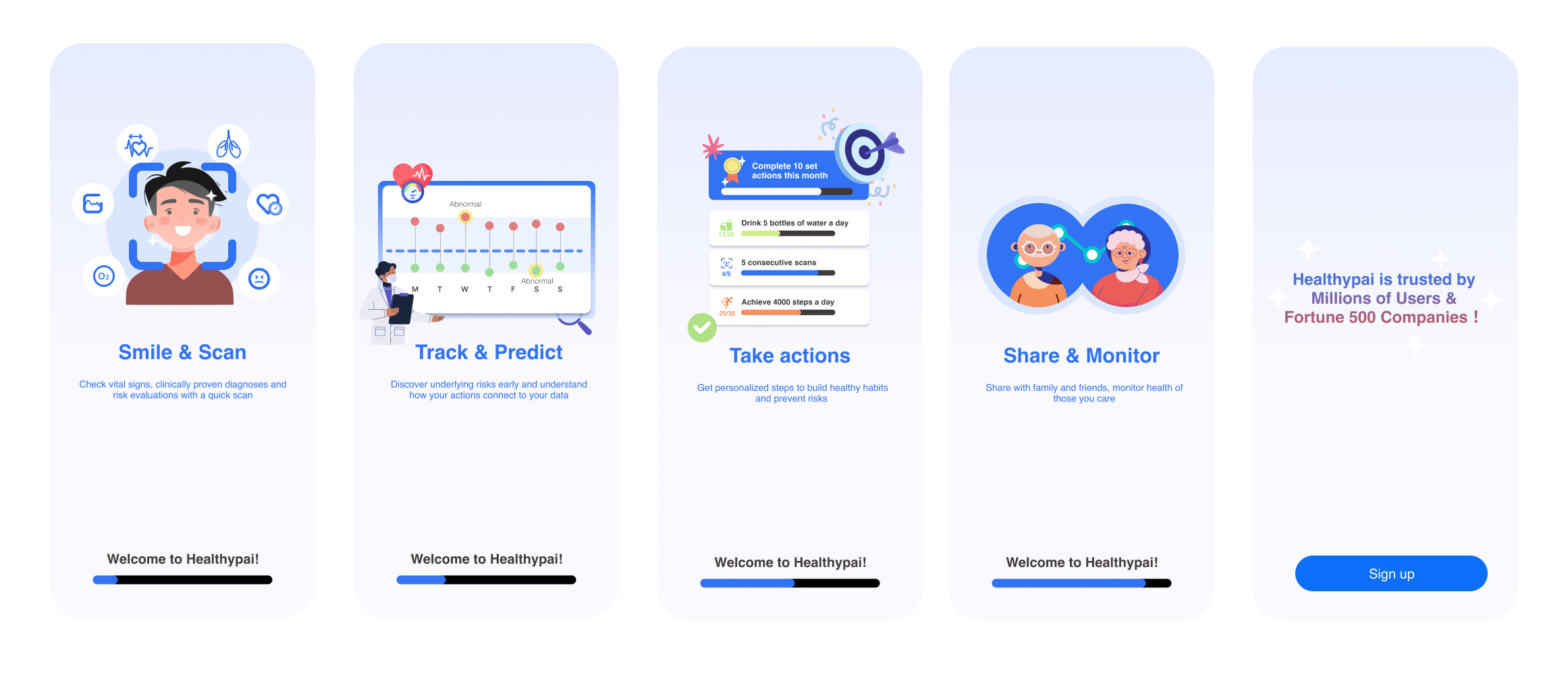
Activation: New user onboarding
Because camera-based measurement is unfamiliar to many first time users, onboarding is essential in explaining the technology clearly, setting clear expectations, and building confidence before the first scan.
Measuring success
Key success metrics:
Because the product have just completed its first round of beta building by the end of my internship, I wasn't able to measure its long-term impact with user data yet. However, it is important to define and measure success to help us inform how to carry the product further.
I defined a three-stage success measuring plan: 1. pre-build validation 2. beta testing 3. post-launch tracking to help inform the pm lead how we would validate the product direction, identify usability and trust issues, and ultimately measure whether the redesign created sustained user value
Core hypothesis: scanning alone would not create enough reason/ value for users to return. The Action experience helps turn health data into something users could understand, act on, and continue engaging with over time.
A complete health loop includes:

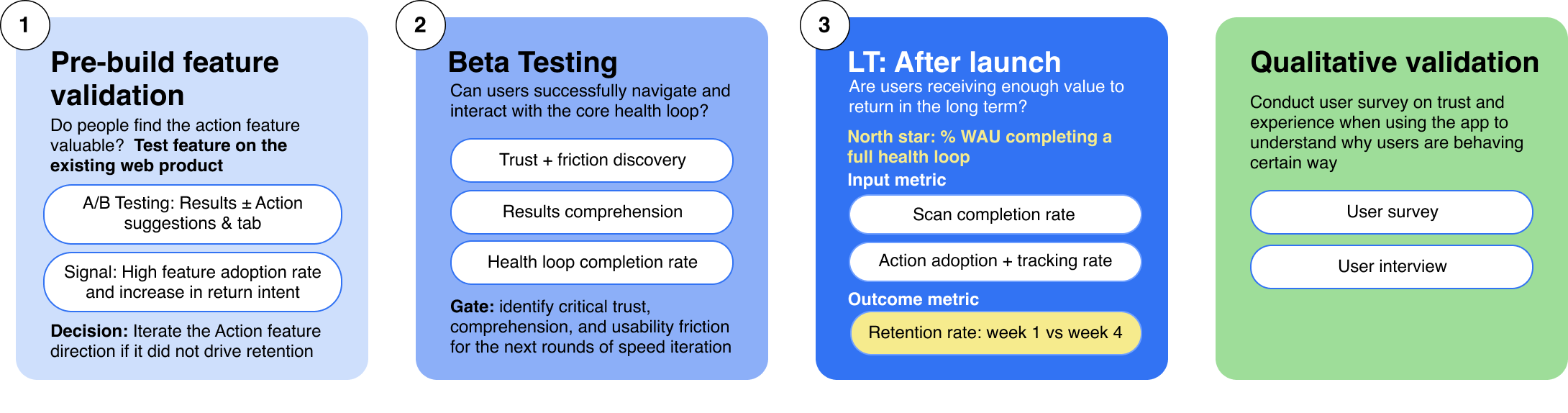
Together, these signals would help determine whether the redesign successfully shifted HealthyPAI from a one-time measurement tool into an ongoing health-management product that users find valuable, and even if not all metric goals are met, it will help us pin point clear friction points and sharpen product value positioning.
Reflection!
Conduct more interations after user testing and evaluation through sucess metrics
Explore further on how to build long term product growth
Wishes
Takeaways
As a Product Manager:
It’s important to come back to user experience and dive deep to discover the root of user painpoints
Product manager’s role is not just solving expressed user needs but also uncovering and delivering hidden value users didn’t know to ask for
As a Product Designer:
Creating a clear sense of progress and reward is key to driving user motivation and retention
Data is only meaningful to users when their indications are showned
Optimize information on a single page, too much information will immediately overwhelm and demotivate users
Small interaction improvements can make big impacts on trust building and make technology feel more personal:)
Keeping key product and business objectives in mind is important when making all design decisions from function hierarchy to visual interface design